บริการ ติดโพย (PopThai)
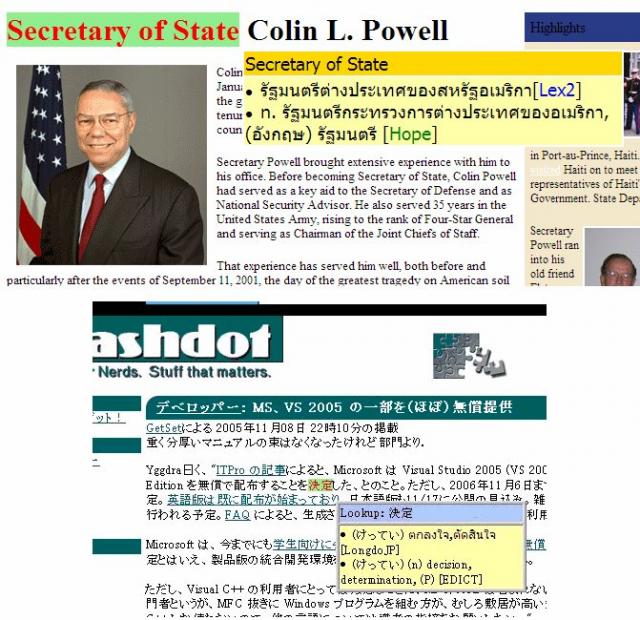
เป็นบริการเปิดพจนานุกรมอัตโนมัติ โดยผู้ใช้สามารถป้อนข้อความ ทีละประโยค หรือ เป็นหน้าเลยก็ได้ ไม่จำเป็นต้องทีละคำสองคำ
ระบบจะทำการแนบความหมายของคำหรือวลีภาษาต่างประเทศ
(ปัจจุบันสนับสนุน ภาษาอังกฤษ, ญี่ปุ่นและเยอรมัน )
ติดกับเนื้อหานั้นๆ และจะแสดงผลความหมายเมื่อเอาเมาส์ไปวางเหนือคำหนึ่งๆ
ช่วยให้สามารถเข้าใจเนื้อหาของเวบภาษาต่างประเทศได้สะดวกและรวดเร็วยิ่งขึ้น
ความหมายของคำจะปรากฏขึ้นมาเมื่อท่านเอาเมาส์ไปวางบนคำหรือวลีที่มีอยู่ในพจนานุกรม
โดยไม่จำเป็นต้องกดปุ่มใดๆ
ดังตัวอย่างในรูปข้างล่างนี้
คุณสมบัติ / Features
แสดงความหมายของคำโดยอัตโนมัติ เพียงวางเมาส์ไว้บนคำที่ต้องการทราบความหมาย
สนับสนุนเวบหลากภาษา (ปัจจุบัน ภาษาอังกฤษ ญี่ปุ่น และเยอรมัน)
ค้นหาความหมายจากพจนานุกรมหลายชุดพร้อมๆกัน ในฐานข้อมูลของ Longdo ได้แก่
Lexitron2, Hope, Nontri, Longdo อังกฤษ-ไทย, Longdo เยอรมัน-ไทย เป็นต้น
แสดงได้ทั้งความหมายของคำเดี่ยว และคำผสม ได้อย่างถูกต้อง
เช่น Secretary of State=รัฐมนตรีต่างประเทศของสหรัฐฯ (ในภาพตัวอย่าง),
High school=โรงเรียนมัธยมปลาย
แสดงความหมายของคำที่แปรรูปจากคำในพจนานุกรมได้ เช่น
เมื่อวางเมาส์ไว้บนคำว่า executed/abusing ซึ่งไม่มีในพจนานุกรม
เครื่องจะแสดงความหมายของคำว่า execute/abuse ให้โดยอัตโนมัติ
เรียกใช้งานได้ง่ายเพียงกดปุ่ม PopThai บน
Longdo Toolbar
เพื่อแนบความหมายหน้าจอที่เปิดชมอยู่ในขณะนั้น
แก้ไข Link ในหน้าที่แสดง เพื่อให้สามารถเปิดชม Link เหล่านั้นผ่านบริการ PopThai
ได้ทันทีเช่นเดียวกัน
สนับสนุนบราวเซอร์ชั้นนำทั่วไป เช่น Internet Explorer, Firefox, Chrome, Safari, Konqueror, etc.
แสดง Link ให้ผู้ใช้ช่วยป้อนความหมายสำหรับคำที่ยังไม่มีอยู่ในพจนานุกรม
ใหม่: ใหม่:
วิธีใช้
ท่านสามารถป้อนเนื้อหาหรือ URL ของเว็บไซต์ที่ต้องการให้แนบความหมายนี้ ในช่องใส่ข้อความค้นหาปกติ
หลังจากนั้นเลือกบริการที่ต้องการ (เช่น ถ้าป้อนข้อความ ให้เลือก PopThai (text) ถ้าป้อน URL ให้เลือก PopThai (URL)) ถ้าท่านไม่เลือกบริการ
ระบบจะเดาบริการที่ท่านต้องการ จากข้อความที่ท่านใส่เข้ามา (ว่าเป็นข้อความหรือเป็น URL) โดยอัตโนมัติ,
จากนั้นกด Submit เป็นอันเสร็จ
ในกรณีที่ท่านใส่ URL ระบบจะไปทำการดาวน์โหลดเนื้อหาของหน้านั้นๆ มาและแนบความหมาย พร้อมแก้ไขลิงค์ต่างๆ ให้เป็นผ่านบริการ PopThai เ
พื่อที่ว่าเมื่อท่านกดที่ลิงค์ใดๆ ต่อไปจากเพจนั้นๆ ก็จะมีการแนบความหมายมาให้ด้วยในทันที
เพื่อเพิ่มความสะดวกในการใช้ท่านสามารถใช้ PopThai ผ่าน Longdo Toolbar โดยเมื่อท่านเปิดดูเว็บไซต์ใดๆ อยู่ตามปกติ และต้องการใช้บริการ PopThai สำหรับ
หน้านั้นๆ สามารถทำได้ทันที โดยคลิกที่ปุ่ม PopThai บน Toolbar รายละเอียดเพิ่มเติมโปรดอ่านที่ Longdo Toolbar
คำเตือน
Problems & TODO
inflected word support (German)
support HTTP POST
other foreign language support (Japanese, French)